
This walks through our oh you can make it cap AI video generator from picking photos to posting. If you haven’t seen the original yet, the oh you can make it cap AI trend page has it shot by shot.
Step 1: Pick two photos
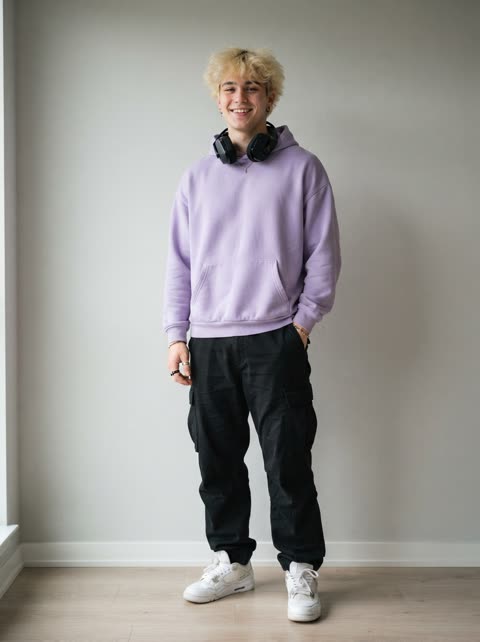
You need one photo of you and one of a friend. The AI copies faces, hair and clothes from these two pictures, so a good photo matters more than anything else on this page.
- One person per photo. Crop out anyone else.
- Face the camera, face sharp and well lit. Sunglasses, masks and beauty filters make the face drift.
- Waist up if you can. That is close enough for the face and wide enough to show the outfit. You wear the clothes from your photo in the video, not the suits from the original. If the photo stops at the waist, the AI continues the same outfit below it.
- JPG, PNG or WebP, up to 10 MB. iPhone HEIC files get rejected, so export as JPG or take a screenshot.
- Only use photos of yourself and of adults who said yes. No minors, no celebrities.
Decide who plays who
Your photo plays the bald guy with the chin rub, the smirk and the laugh behind the hand. Your friend’s photo plays the curly-haired guy with the hair flip and the grin into the mic.
Think about who fits which part. The person who always does too much probably wants the hair flip. If you change your mind later, put the photos the other way round and make it again.
Step 2: Upload and generate
- Open the generator. Put your photo in the “Your photo” slot and your friend’s in “Friend’s photo”.
- Tick the box that says these are your photos or everyone in them said yes.
- Choose Standard (480p) or HD (720p). Both are the same 15 seconds with the same moves; HD is sharper.
- Press Generate and pay with PayPal. A single video works without an account.
Before the render starts, both photos go through a content check. If a photo is blocked, nothing is charged and you can pick another one.
Step 3: Wait about 5 minutes
A render usually takes about 5 minutes. You can close the page. Come back in the same browser or sign in, and the video is waiting; it is also listed under My videos. If the AI can’t finish it, the credits go back to your balance automatically.
Step 4: Download, add the sound, post
The MP4 has no audio. The sound belongs to someone else, so you add it inside the app you post to.
- Download the MP4 to your phone.
- Open TikTok, Instagram Reels or YouTube Shorts and start a new post from that video.
- Open the sound picker and search for “oh you can make it cap”.
- Play it through and trim the start until the moves land on the words. The cuts in our video sit where the original’s do, so a small trim is usually enough.
- Optional: stack the original on top and yours underneath, the way most remakes do. The video is landscape (about 4:3) like the original, so the two fit one above the other.
Need a caption? There are a few in the oh you can make it cap AI video examples.
Mistakes that ruin it
- A group photo, or a photo where the person is tiny. The face comes out generic.
- Expecting suits. You get the clothes from your photos. Want suits? Use photos where you are wearing one.
- Expecting sound in the file. It is silent on purpose.
- Wrong person in the wrong part. Swap the two photos and make it again.
- Pet photos. The clip is built around two people and we haven’t tested pets, so we can’t promise anything.
Something else went wrong? See oh you can make it cap AI not working.
How to do the oh you can make it cap AI trend: FAQ
How do you do the oh you can make it cap AI trend?
Upload a photo of you and a photo of a friend in the generator, press Generate and wait about 5 minutes. Download the 15-second MP4, then add the “oh you can make it cap” sound in TikTok, Reels or Shorts and post.
Which photo plays which guy?
Your photo plays the bald guy who rubs his chin and laughs. Your friend’s photo plays the curly-haired guy who flips his hair and grins into the mic. To switch parts, swap the photos.
Can I do it with only one photo?
No. The generator needs two photos, one person each, because both guys in the clip are remade. If you only want your own face on a fixed clip, a one-photo CapCut template does that.
Can I put two people in one photo?
No. Use one person per photo. A group shot leaves the AI guessing which face to use, and the result usually looks like neither of you.
Do I need an account to make one?
Not for a single video: you can pay with PayPal without signing up. The video is saved to an account under your PayPal email, and you can open it again in the same browser within 7 days. The 2 HD and 3 HD packs need you to sign in first.
How do I line the video up with the sound?
Add the sound in the TikTok, Reels or Shorts editor, play it back, and trim the start of the sound or the clip until the chin rub and the hair flip land on the right words.